Customer and operator views can drift apart.
When the current state is hard to read, even a small menu or theme change becomes difficult to trust.
 Finish the StuffThe workTalk to June
QRDER · Illustrative product design
This story describes the interface shown in the existing design assets. It is not presented as a deployed client outcome or a claim of measured results.

When the current state is hard to read, even a small menu or theme change becomes difficult to trust.
The proposed system connects a customer-facing menu to theme selection, unpublished-change labels, preview, and operating context.
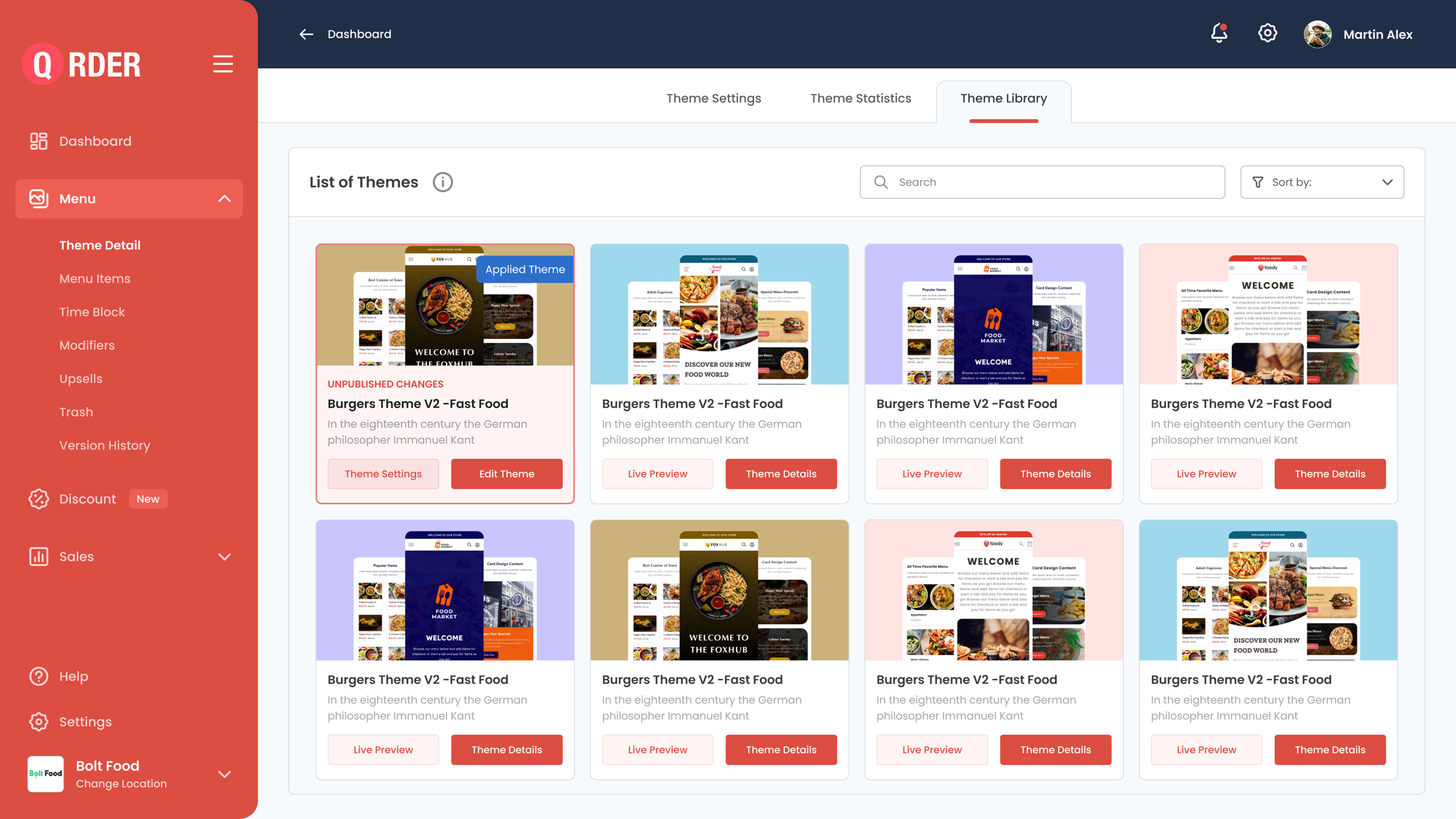
An operator can identify the applied theme, see that changes are still unpublished, and choose the next editing or review action.
The label before the button
The theme library shows both “Applied Theme” and “Unpublished Changes.” The selected card exposes settings and editing controls; other cards keep preview and details available. That distinction is the useful part of the story.
A readable customer-facing view makes the purpose of the system concrete.

Your turn