
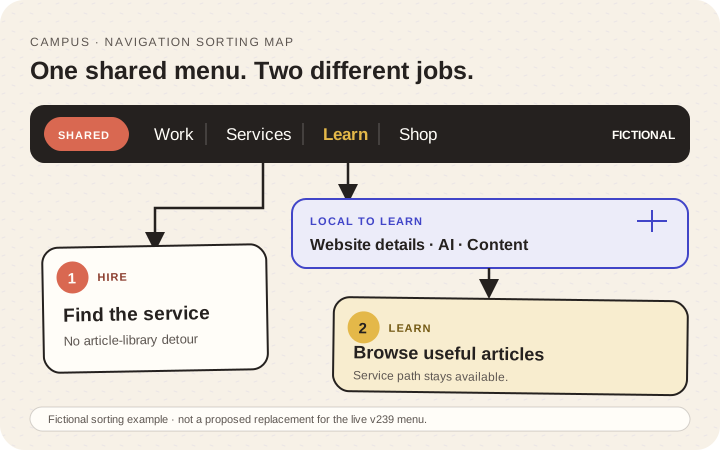
Short answer: write down the main jobs people arrive to complete, map each job to a real destination, and keep the shared menu separate from section-specific navigation. Test the proposed labels and routes before changing the live header.
Finish with: one primary-menu proposal, one local-navigation proposal where a section needs it, and three route cards that record a reader’s starting point, expected destination, actual destination, and unresolved issue.
Verification status: W3C navigation guidance and Google crawlable-link guidance were reviewed for this draft. No live v239 navigation was changed or tested. The controlled example below is fictional and is not a redesign proposal for the current Finish the Stuff header.
Illustrative route map, not the live Finish the Stuff navigation. The same model is provided in text below.
Start with four reader jobs, not a list of departments
Use a controlled fictional business called Mending Room. It offers repair work, shows completed projects, publishes free repair lessons, and previews a small collection of templates. Its visitors arrive with four different intentions:
- “I need someone to repair this.”
- “I want to see the kind of work they do.”
- “I want to learn a repair skill.”
- “I want to inspect the templates that exist.”
Those intentions suggest recognizable destinations such as Services, Work, Learn, and Shop. They do not automatically justify four departments, four brands, or four homepages. The labels are a hypothesis to test, not a universal menu formula.
Write the actual visitor jobs for the site you own. Use the reader’s language. If the only description is “learn about us,” ask what useful decision that information supports.
Sort every existing link by its job
Create a simple inventory before hiding or moving anything:
| Current destination | Reader job | Proposed home | Exists now? | Status language needed |
|---|---|---|---|---|
| Repair assessment | Hire help | Shared menu | Yes | Service conversation |
| Project gallery | Evaluate work | Shared menu | Yes | Completed work only |
| Repair lessons | Learn | Shared menu → Learn | Yes | Free learning |
| Template preview | Inspect tools | Shared menu → Shop | Preview only | Not yet for sale |
| Lesson topics | Browse learning | Learn local menu | Yes | Topic labels |
Removing a link from the top menu is not permission to delete its page. Preserve the route until redirects, inbound links, ownership, and future use have been reviewed separately.
Do not add a customer library, account, checkout, course dashboard, or download promise simply because the label would make the menu look complete. A menu must describe available destinations, not planned infrastructure.
Give shared and local navigation different responsibilities
The shared menu answers, “Which part of the organization do I need?” Local navigation answers, “What can I do inside this part?”
This global/local split is a Finish the Stuff planning method, not a rule prescribed by the W3C tutorial.
For Mending Room, the shared menu may contain Services, Work, Learn, and Shop. Inside Learn, the local choices might be Repair basics, Tools, Finishing, and Project handoff. The topic menu should not become a second global header, and the global menu should not contain every lesson topic.
The W3C menus tutorial provides implementation guidance for structurally marking up navigation, identifying states, and supporting keyboard interaction. Ordinary site navigation usually does not need the ARIA menu or menubar role; those roles imply the more complex interaction model of an application-style menu. Treat the proposed labels and hierarchy as content decisions; interaction behavior still needs implementation and accessibility review.
Someone entering a tutorial from search should be able to recognize the site and reach services without being pushed into a sales step. Someone seeking paid help should not have to browse tutorials before reaching the service route.
Test three route cards on a controlled preview
Do not begin with a full redesign. Create three route cards and exercise them on a private prototype or a site you are authorized to inspect.
Route A — hire help
Start: deep Learn article
Prompt: Find where to discuss implementation work
Expected: service conversation route
Actual:
Unresolved:

Route B — continue learning
Start: homepage
Prompt: Find a lesson about website images
Expected: Learn library, then the correct topic/article
Actual:
Unresolved:

Route C — inspect a product preview
Start: deep Learn article
Prompt: Find available templates without assuming checkout exists
Expected: Shop preview with an honest not-for-sale state
Actual:
Unresolved:
Ask a person unfamiliar with the proposed labels where they would click first. Do not coach them. Record the choice and their reason. This is qualitative evidence about one wording proposal, not a universal usability conclusion.
Verify labels, links, and the collapsed menu separately
For every proposed label, record its exact destination and whether that destination exists. Use ordinary links with real destinations. In HTML, the reliable pattern is an anchor element with an href value that resolves to the intended URL—for example, <a href="/learn/">Learn</a>. Google’s crawlable-link guidance describes that pattern; it does not authorize keyword stuffing or links to unfinished features.
Then exercise the collapsed mobile menu on the actual integration candidate:
- Does the control have a clear accessible name and state?
- Can it be opened and closed with the intended keyboard route?
- Can every visible destination be reached in a logical order?
- Does the current area remain understandable?
- Do service, learning, work, and preview labels match what is actually available?
- Does browser Back return the reader to a sensible context?
Hover behavior alone is not a touch or keyboard interaction plan. Identify the implemented pattern before choosing an acceptance check. A disclosure or non-modal navigation panel does not automatically trap focus; its controls and destinations should remain reachable in a logical sequence. A true modal dialog makes the rest of the page inert and keeps its tab sequence inside the dialog until it closes. Review each implementation against the pattern it actually uses rather than inventing key behavior from memory.
For destinations, prefer semantic links with real href values. Use a button for a control that shows or hides content. Do not add ARIA menu semantics to ordinary site navigation unless the full expected widget behavior is intentionally implemented and tested.
Completion check
The menu proposal is ready for integration review when each primary label maps to a real reader job, every route exists or is explicitly withheld, local topics stay inside their section, and the three controlled journeys can be completed on desktop and mobile without an unavailable-feature promise.
Verification note: Primary sources were rechecked on 23 October 2026. No live navigation, account, checkout, or route was changed or tested for this article.