
Short answer: name what each animation communicates, make that information available before movement begins, and design a complete stable version for people who prefer reduced motion. Test both paths in a controlled preview; do not treat a screenshot as proof of motion behavior.
Finish with: a motion inventory and a paired storyboard showing how one sequence delivers the same essential facts in regular and reduced-motion modes.
Verification status: MDN media-feature documentation and W3C preliminary accessibility guidance were reviewed for this draft. No live v239 animation or device behavior was tested. The storyboard below is a controlled fictional example.
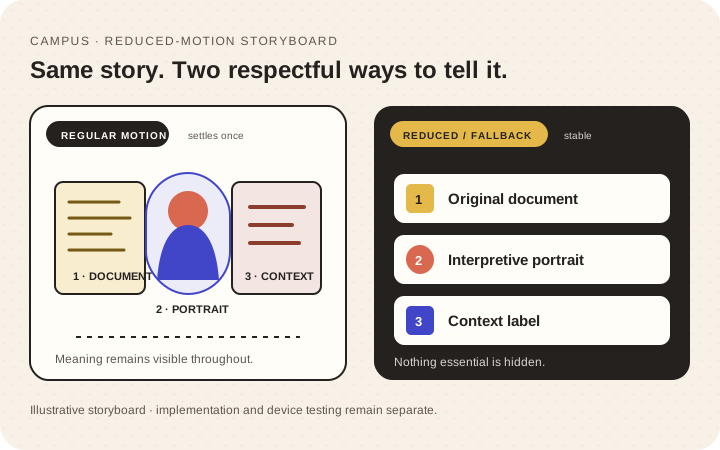
Illustrative storyboard, not a captured live animation. Both paths are described in text.
Motion inventory: decide what the effect is doing
List each moving sequence before changing duration or easing:
| Sequence | Reader meaning | Essential? | Trigger | Reduced path |
|---|---|---|---|---|
| Document expands into portrait | Connects source artifact to person | Relationship is essential; zoom is not | On scroll | Stable document and portrait with caption |
| Progress indicator advances | Shows article position | Useful status | On scroll | Stable indicator updates without flourish |
| Background shapes drift | Atmosphere only | No | Automatic | No movement |
If the only explanation is “it looks impressive,” treat the effect as decorative. That does not automatically forbid it, but it does mean the page must remain complete without it.
Do not hide essential headings, images, or instructions at zero opacity and rely on scroll-triggered JavaScript to make the article readable. The stable first state should communicate enough to understand and operate the page.
Paired storyboard: preserve the story, not the choreography
Use a fictional three-part exhibit sequence:
Regular-motion path
- A labeled document is visible before the effect begins.
- A bounded transition connects the document to a portrait.
- A caption explains why the two belong together.
Reduced-motion path
- The same labeled document is visible.
- The portrait appears in a stable adjacent position without a large zoom, depth shift, or continuous movement.
- The same caption explains the relationship.
The transition can change; the document, portrait, explanation, reading order, and controls cannot disappear. If a process genuinely needs motion to demonstrate a change, add a text explanation, still sequence, or user-started alternative rather than hiding the lesson.
Respect the preference in implementation
Browsers can expose a device preference through the CSS prefers-reduced-motion media feature. MDN documents the feature and its values. The reduce value communicates a preference to minimize non-essential motion; it does not mean that every animation must be removed. Design an intentional static, reduced, or replaced treatment instead of shortening every animation to an arbitrary duration.
WCAG scopes differ. Animation from Interactions explains WCAG 2.2 Success Criterion 2.3.3 at Level AAA. Pause, Stop, Hide explains Success Criterion 2.2.2 at Level A: automatically started moving, blinking, or scrolling content has conditions including the five-second threshold, while auto-updating information has separate conditions and no five-second exception. Both criteria include stated essential-content exceptions. This tutorial is a design workflow, not a conformance determination.
no-preference means that no preference is known; it does not prove that motion is safe or wanted. A visible control can still be useful for significant non-essential motion, but its necessity depends on the sequence and applicable requirement. Keep the page understandable when CSS, media, or animation code fails. Do not add autoplay audio, force a reader to manage several controls before reading, or couple essential content to scroll speed.
If the experience has a separate user-facing motion control, its state and effect need their own design and testing. Do not imply this article requires such a control for every site.
Controlled preview protocol
Create or use a private preview you own. Do not begin on production.
Record:
Sequence:
Browser and version:
Operating system:
Viewport/device:
Regular-motion result:
Reduced-motion result:
Essential facts present in both:
Keyboard controls usable in both:
Media/script failure result:
Unresolved owner:
Then run two explicit paths:
- With the regular preference, load or revisit the page as the implementation requires. Observe the complete sequence, scroll down and back up if scrolling drives it, and confirm the initial state is readable.
- Enable the operating-system reduced-motion preference, reload or revisit as required, and confirm the stable alternative shows the same essential facts, labels, and controls.
Finally, simulate only the safe failures available in the controlled environment: for example, inspect the static markup with the animation disabled. Do not disable security settings or interfere with a third-party site merely to produce a test.
Keep the evidence type explicit. A CSS or browser-emulated media query proves only the simulated rendering. A recorded operating-system preference proves the tested browser/OS path. Neither is physical-device proof unless the named physical device was actually used. Screenshots can confirm static frames, clipping, and visible text; they cannot prove timing, focus behavior, playback controls, or comfort. Record motion with an authorized local screen capture only when that evidence is useful and contains no private material.
Acceptance record
Use three states rather than a vague “accessible” checkbox:
- Pass for this sequence: same essential story and controls in both tested paths.
- Revise: important content exists, but the reduced path loses context, focus, or reading order.
- Not checked: device, browser, control, media failure, or specialist review was outside the exercise.
The W3C preliminary accessibility checks are a useful companion, but a complex animation may need specialist and user review beyond a preliminary pass.
Completion check
This exercise is complete when the effect’s purpose is written down, both storyboards contain the same essential information, the controlled preview has dated results for both preference paths, and every untested behavior remains labeled—not converted into a pass.
Verification note: Primary documentation was rechecked on 23 October 2026. No live-site animation, operating-system preference path, or physical device was tested for this article; future evidence must keep simulation, browser/OS testing, and physical-device testing distinct.