
Short answer: copy the headings into a plain outline, rewrite them so the list explains the page, group sections by relationship, then apply actual heading elements that match that hierarchy. Choose heading levels for structure—not because their default size looks convenient.
Finish with: a readable outline, a page whose H1/H2/H3 structure matches it, and a final mobile and accessibility review note.
Verification status: W3C page-structure guidance was reviewed on 22 October 2026. The instructions have not yet been reproduced in a specific CMS or checked with assistive technology for publication.
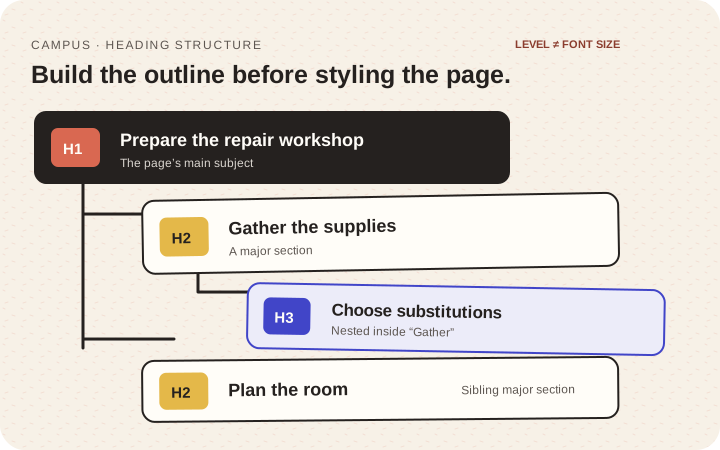
Illustration: original explanatory comparison. The complete example also appears as text below.
1. Read only the headings
Copy the current headings into a document without the body text. Ask whether that list tells a coherent story and makes likely answers easy to find.
For a fictional workshop guide, this outline reveals little:
- Welcome
- Everything you need
- More details
- Get started
A useful version is more specific:
- H1 — Prepare the repair workshop
- H2 — Gather the supplies
- H3 — Choose substitutions (nested inside “Gather the supplies”)
- H2 — Plan the room (a sibling of “Gather the supplies”)
- H2 — Gather the supplies
Someone returning for the supply list should not have to remember that it was hidden under “Small things, big possibilities.”
2. Group content before assigning levels
Give the page one main subject. Put major sections beneath it and smaller topics inside the section they explain. A materials list and substitution advice may belong in one major section, with substitutions as a subsection.
In a straightforward article structure:
- H1 identifies the primary page topic;
- H2 identifies major sections;
- H3 identifies subdivisions within an H2 section.
That is an editorial model, not a claim that a heading count guarantees search ranking. The W3C heading guidance explains that rank expresses content relationships.
Do not choose H4 because it happens to look smaller. Style and structure are separate decisions.
3. Make every heading help someone navigate
Replace “Important” with what is important. Replace “Our approach” with the actual topic when that would help the reader. A heading promising pricing should not lead only to a contact button.
Cover the paragraphs and ask someone where they would look for a required tool, safety warning, price, or final check. If their guess does not match the organization, fix the label or move the content.
Not every label, caption, or sentence needs to become a heading. Ordinary supporting text can remain ordinary text.
4. Apply real structure in the editor
Use the CMS heading controls rather than visually bolding paragraphs. In a code-managed page, use actual heading elements for section titles. Check the rendered page, not only the editor toolbar; pasted content and custom components can produce unexpected markup.
Reserve headings for naming content sections. Keep actions as buttons and navigation as links, even when their visual styling resembles a heading.
5. Support readers who enter halfway through
Readers often arrive at a specific section. On a long article, a concise contents list can help, but its labels should match the headings exactly. Section links should land where the relevant heading remains visible rather than hidden behind a sticky header.
The W3C page-structure tutorial also describes semantic regions. A good heading outline works alongside those regions; it does not replace them.
6. Check the final page
- Read only the headings again.
- Check that levels express the intended nesting.
- Inspect a narrow phone for awkward wraps or excessive gaps.
- Verify that section links land correctly.
- Ask an accessibility reviewer to inspect heading navigation when possible.
A visual skim cannot confirm every assistive-navigation experience, so record what was and was not checked.
Done means: someone can predict where information lives from the headings, and the rendered page’s actual structure reflects those relationships.
Verification note: Primary documentation was rechecked on 23 October 2026. CMS reproduction, assistive-technology review, integration QA, and accessibility acceptance remain pending.