
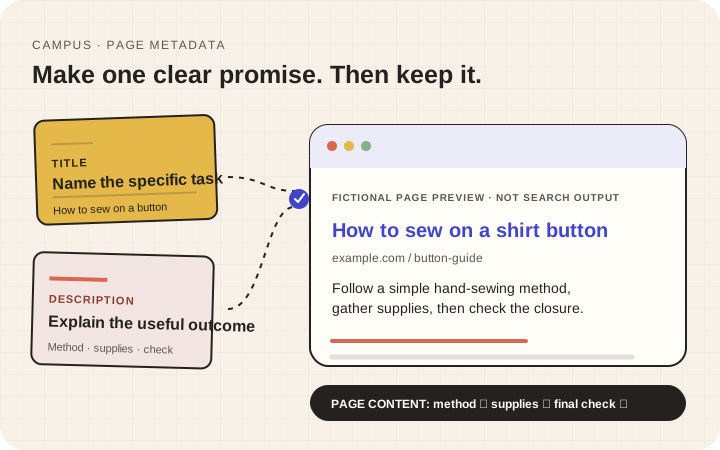
Short answer: describe the page’s actual task near the beginning of a distinct title, write a useful summary that the page can keep, place both in the correct page fields, and inspect the result. Search engines may rewrite title links and snippets, so accuracy—not a guaranteed display or ranking—is the acceptance test.
Finish with: one accurate HTML title, one accurate meta description, a visible heading that supports them, and a dated record of what changed.
Verification status: Google Search documentation was reviewed on 22 October 2026. No CMS implementation or post-publication search observation has been performed for this draft.
Illustration: fictional explanatory mockup, not a live Google result or ranking claim.
1. Start with the page’s real job
Write one sentence: “This page helps a reader ___.” If the page has several unrelated jobs, resolve that before polishing metadata.
The visible page heading is what a visitor reads. The HTML title can appear in the browser tab and is one possible source for a search title. The meta description is a summary that a search engine may use for a snippet. They should agree about purpose without being identical.
Google can construct title links and snippets from several signals, including page content. Read its title-link guidance and snippet guidance.
2. Draft from the useful answer
For a fictional page that teaches button repair:
- Title:
How to sew on a shirt button | Mending Room - Heading:
Sew a loose shirt button back on - Description:
Follow a simple hand-sewing method, gather the supplies, and check that the button closes comfortably before you finish.
These are fictional examples. The description is appropriate only if the page actually provides the method, supplies, and final check.
Try this working formula:
Title: specific task or page purpose + useful differentiator or brand Description: what the reader can do or learn + an important scope detail
Use the formula as a drafting aid, not a rigid template.
3. Remove claims and repetition the page cannot support
Delete “number one,” “guaranteed,” “official,” “same-day,” and similar claims unless they are accurate, appropriate, and substantiated. Remove strings of repeated keyword variants. Replace “Home” or “Welcome” when those words do not distinguish the page.
Name a location only when the page accurately serves and describes that place. Do not imply service areas or offices that the page and business cannot substantiate.
4. Edit for clarity, not a magic character count
Search display space varies. Put the important task early and remove words that add no meaning. A preview tool can help compare drafts, but it cannot promise the exact appearance for every device or query.
Read the title aloud. Would someone know what they are opening? Then read the description without the title. Does it explain the page’s actual scope rather than repeat a slogan?
5. Put the wording in the correct fields
A website builder may call these controls “SEO title” and “SEO description.” Confirm that you are editing the intended page, not a sitewide default. In a code-managed site, ask the maintainer to set the title element and meta description in the document head.
Do not change the public URL merely because the title changed. URL changes are a separate task with link and redirect consequences.
Record the old and new values, page URL, date, owner, and reason. This makes later review possible without inventing causation.
6. Inspect the page and observe carefully
On a private preview, check the browser-tab title and inspect the rendered metadata with the maintainer. Confirm that the visible heading and body deliver the promised answer.
If the page is published later, allow time for discovery and processing. Google's Search Console overview explains that it can show queries, impressions, and clicks when available, but low clicks do not prove the title is the only problem, and one change does not prove causation.
Final expectation check
Ask someone to read only the title and description, then describe what they expect. If their expectation differs from the page, fix the promise or the page before publication.
Done means: one distinct page has accurate metadata, its body delivers the promised answer, and the record shows what changed. Rankings and exact snippet wording are not acceptance tests you can guarantee.
Verification note: Primary documentation was rechecked on 23 October 2026. A specific site still needs deployed-source inspection and post-publication observation after applying the method.